Get Identification
Three endpoint variants let you retrieve a single identification by its transaction number or IdentID, or list identifications filtered by status.
All requests require the auth header:
| Header | Type | Required | Description |
|---|---|---|---|
X-API-LOGIN-TOKEN | string | Yes | Auth token for authentication |
Get by transaction number
GET /api/v1/{customer}/identifications/{transaction-number}
| Parameter | Type | Description |
|---|---|---|
customer | string | Your company identifier |
transaction-number | string | The transaction number you assigned at identification creation |
Get by IdentID
GET /api/v1/{customer}/identifications/{identid}
| Parameter | Type | Description |
|---|---|---|
customer | string | Your company identifier |
identid | string | The IdentID returned by the Create Identification endpoint (e.g. ABC-DEFGH) |
Both variants return the same response structure.
Get identifications by status
Add a query parameter to retrieve a list of all identifications for your account in a given status.
GET /api/v1/{customer}/identifications?{parameter}=true
| Query parameter | Status returned |
|---|---|
pending | REVIEW_PENDING identifications awaiting manual review |
aborted | Aborted user quit before completing |
canceled | Cancelled cancelled by an IDnow agent |
successful | Finished identifications with a final outcome: SUCCESS, SUCCESS_DATA_CHANGED, or FRAUD_SUSPICION_CONFIRMED |
Example: retrieve all pending identifications:
GET /api/v1/{customer}/identifications?pending=true
Response
The response is a JSON object with the following top-level blocks:
| Block | Type | Description |
|---|---|---|
identificationprocess | object | Core identification metadata, see fields below |
customdata | object | The custom1–custom5 fields you sent at identification creation |
contactdata | object | Contact information provided at creation (mobilephone, email) |
userdata | object | Personal data fields with per-field status and values, see below |
identificationdocument | object | Primary document data extracted during verification |
identificationdocument2 | object | Second document data, present only when a driver's licence was also scanned. Type is always DRIVERS_LICENSE |
additionaldocuments | array | Additional documents (e.g. utility bill for Proof of Address) |
questions | object | Answers to pre-defined or agent-asked questions (VideoIdent only), see questions fields |
attachments | object | Result files: PDF, images, audio/video logs, security feature captures, see attachments fields |
This same JSON structure is sent in the body of all webhook calls.
identificationprocess fields
| Field | Type | Description |
|---|---|---|
result | string | Current result or interim state, see Result values below |
reason | string | Reason code qualifying the result. See Abort reasons, Cancel reasons, and Fraud-suspicion reasons for the full lists. |
companyid | string | Your company short name |
transactionnumber | string | Transaction number you assigned at creation |
id | string | IdentID (format: ABC-DEFGH) |
identificationtime | string | ISO 8601 timestamp of when the identification was completed; null if not yet completed |
filename | string | Name of the result ZIP file |
href | string | Path to retrieve the result ZIP file |
type | string | Always APP |
agentname | string | Name of the reviewing agent; TROBOT for automated test robot reviews |
wasnfcused | boolean | true if NFC chip reading was used during the identification |
poaresult | string | Proof of Address result (SUCCESS, FAILED); only present when PoA feature is enabled |
customdata fields
The customdata block returns the custom values you passed at identification creation. Use these fields to attach your own IDs, tags, or any other metadata you need to correlate with the identification.
| Field | Mandatory | Description | Example |
|---|---|---|---|
custom1 | No | Custom text field. Use it for your own IDs, tags, etc. | Your own internal ID (e.g. 287492_23552) |
custom2 | No | See custom1. | |
custom3 | No | See custom1. | |
custom4 | No | See custom1. | |
custom5 | No | See custom1. |
contactdata fields
The contactdata block holds the user's contact details. The values are either passed at identification creation or entered by the user during the process. If the user updates a value (e.g. their mobile phone number) during the identification, the updated data is returned here.
| Field | Mandatory | Description | Example |
|---|---|---|---|
email | No | The user's email address. | sampleuser@example.com |
mobilephone | No | The user's mobile phone number. | 0151 23411232 |
userdata fields
The userdata block contains the user's personal data as retrieved during the identification, with information about whether values were changed. Each field carries a status and, depending on the status, a value and/or original.
| Field | Mandatory | Description |
|---|---|---|
firstname | Yes | The user's first name(s). Uppercase. |
lastname | Yes | The user's last name. Uppercase. |
birthday | No | Date of birth in ISO 8601 format: YYYY-MM-DD. |
birthname | No | Birth name of the user. Do not include prefixes, only the name itself. |
birthplace | No | The user's birthplace. Uppercase. |
gender | No | The user's gender. MALE or FEMALE. |
nationality | No | The user's nationality. Uppercase two-letter code (ISO 3166). |
title | No | Academic title. Only used when the title is part of the name and shown on the ID document. |
street | No | The user's street. Provided inside the address sub-object. Uppercase. |
streetnumber | No | The user's street number. Provided inside the address sub-object. Can be configured to be merged into street if you store street and number together, contact your IDnow account manager. |
zipcode | No | The user's zip code. Provided inside the address sub-object. |
city | No | The user's city. Provided inside the address sub-object. Uppercase. |
country | No | The user's country. Provided inside the address sub-object. Uppercase two-letter code (ISO 3166). |
userdata field statuses
Each field in userdata (and identificationdocument) carries a status indicating how the value was determined:
| Status | Meaning |
|---|---|
NEW | Value was read from the document; you did not provide this field at creation. Only value is present. |
ORIGINAL | Document was not read for this field (e.g. identification aborted, or field unreadable). Only original (your submitted value) is present. |
MATCH | Document was read and confirms the value you submitted. value contains the confirmed value. |
CHANGE | Document was read and differs from your submitted value. value = document readout, original = your submitted value. |
identificationdocument fields
The identificationdocument block describes the document used by the user during the identification. Each field carries a status.
| Field | Mandatory | Description | Example |
|---|---|---|---|
type | Yes | Type of ID document. One of: IDCARD, PASSPORT, DRIVERS_LICENSE, RESIDENCE_PERMIT, EU_CITIZEN_CARD (eID only). | IDCARD |
country | Yes | Issuing country of the document. Uppercase two-letter code (ISO 3166). | DE |
validuntil | Yes | Date until which the document is valid, in ISO 8601 format: YYYY-MM-DD. | 2020-03-10 |
number | No | The ID number. | 402324847 |
issuedby | No | Government agency that issued the document. Uppercase. | LANDESHAUPTSTADT MÜNCHEN, KVR |
dateissued | Yes (except eID) | Date the document was issued, in ISO 8601 format: YYYY-MM-DD. | 2010-03-10 |
driverlicenses | No | Driver's licence classes present on the document, as an array. Only applicable for driver's licences. See driverlicenses entry. | [{ "type": "ML" }, { "type": "B" }] |
driverlicenses entry
Each item in the driverlicenses array describes one licence class read from the document.
| Field | Description |
|---|---|
licenseClass | The licence class (e.g. A1, B, C1E). |
additionalInformation | Any extra text printed on the licence for this class. |
validFromReadout | How the "valid from" cell was read. One of: DATE (a date is printed), EMPTY (blank or dashes such as ---------), REFERENCE_GERMAN (German licences printing *)). |
validUntilReadout | How the "valid until" cell was read. Same possible values as validFromReadout: DATE, EMPTY, REFERENCE_GERMAN. |
validFrom | The "valid from" date in ISO 8601 format (YYYY-MM-DD). Populated only when validFromReadout is DATE; otherwise null. |
validUntil | The "valid until" date in ISO 8601 format (YYYY-MM-DD). Populated only when validUntilReadout is DATE; otherwise null. |
All fields are extracted automatically by AutoIdent.
Austrian driver's licences with all fields empty are treated as invalid.
Example: German driver's licence backside readout:
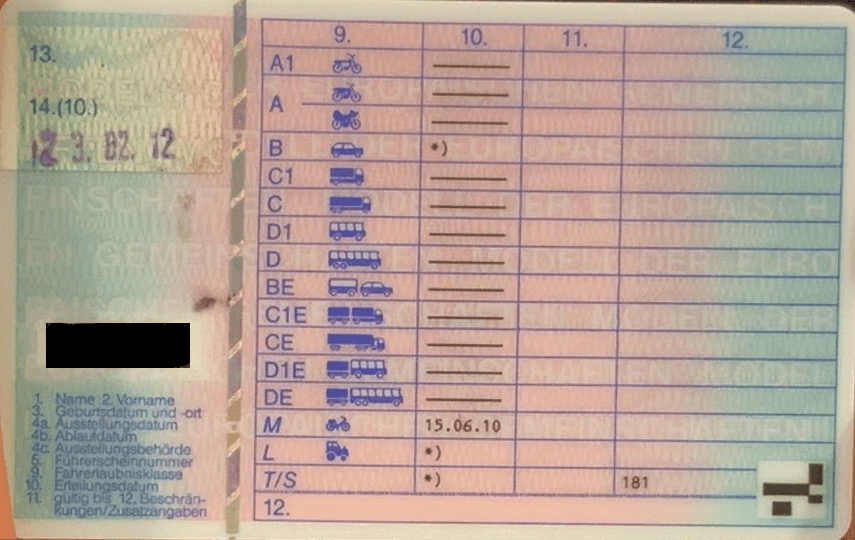
"driverlicenses": [
  { "licenseClass": "A1",  "additionalInformation": null, "validFromReadout": "EMPTY",            "validUntilReadout": "EMPTY", "validFrom": null,         "validUntil": null },
  { "licenseClass": "A",   "additionalInformation": null, "validFromReadout": "EMPTY",            "validUntilReadout": "EMPTY", "validFrom": null,         "validUntil": null },
  { "licenseClass": "A",   "additionalInformation": null, "validFromReadout": "EMPTY",            "validUntilReadout": "EMPTY", "validFrom": null,         "validUntil": null },
  { "licenseClass": "B",   "additionalInformation": null, "validFromReadout": "REFERENCE_GERMAN", "validUntilReadout": "EMPTY", "validFrom": null,         "validUntil": null },
  { "licenseClass": "C1",  "additionalInformation": null, "validFromReadout": "EMPTY",            "validUntilReadout": "EMPTY", "validFrom": null,         "validUntil": null },
  { "licenseClass": "C",   "additionalInformation": null, "validFromReadout": "EMPTY",            "validUntilReadout": "EMPTY", "validFrom": null,         "validUntil": null },
  { "licenseClass": "D1",  "additionalInformation": null, "validFromReadout": "EMPTY",            "validUntilReadout": "EMPTY", "validFrom": null,         "validUntil": null },
  { "licenseClass": "D",   "additionalInformation": null, "validFromReadout": "EMPTY",            "validUntilReadout": "EMPTY", "validFrom": null,         "validUntil": null },
  { "licenseClass": "BE",  "additionalInformation": null, "validFromReadout": "EMPTY",            "validUntilReadout": "EMPTY", "validFrom": null,         "validUntil": null },
  { "licenseClass": "C1E", "additionalInformation": null, "validFromReadout": "EMPTY",            "validUntilReadout": "EMPTY", "validFrom": null,         "validUntil": null },
  { "licenseClass": "CE",  "additionalInformation": null, "validFromReadout": "EMPTY",            "validUntilReadout": "EMPTY", "validFrom": null,         "validUntil": null },
  { "licenseClass": "D1E", "additionalInformation": null, "validFromReadout": "EMPTY",            "validUntilReadout": "EMPTY", "validFrom": null,         "validUntil": null },
  { "licenseClass": "DE",  "additionalInformation": null, "validFromReadout": "EMPTY",            "validUntilReadout": "EMPTY", "validFrom": null,         "validUntil": null },
  { "licenseClass": "M",   "additionalInformation": null, "validFromReadout": "DATE",             "validUntilReadout": "EMPTY", "validFrom": "2010-06-15", "validUntil": null },
  { "licenseClass": "L",   "additionalInformation": null, "validFromReadout": "REFERENCE_GERMAN", "validUntilReadout": "EMPTY", "validFrom": null,         "validUntil": null },
  { "licenseClass": "T/S", "additionalInformation": null, "validFromReadout": "REFERENCE_GERMAN", "validUntilReadout": "EMPTY", "validFrom": null,         "validUntil": null }
]
questions fields (VideoIdent only)
The questions block contains answers to questions that were either pre-defined or asked by the identification agent during the video call. Only present for VideoIdent flows.
| Field | Mandatory | Description |
|---|---|---|
<question key> | No | Key of the configured question; value is the answer captured during the call. |
attachments fields
The attachments block lists the additional files generated during the identification process (audio logs, images, result PDF, etc.). Each entry maps a key to the filename of the attachment.
| Field | Mandatory | Description |
|---|---|---|
pdf | Yes | A PDF file containing the result data with pictures. Default filename: <transactionnumber>.pdf. |
idfrontside | Yes | Image showing the front side of the ID. Default filename: <transactionnumber>_idfrontside.png. |
idbackside | Yes | Image showing the back side of the ID. Default filename: <transactionnumber>_idbackside.png. |
idholograms | No | Image showing the holograms of the ID. Default filename: <transactionnumber>_idholograms.png. |
userface | No | Image showing the face of the user. Default filename: <transactionnumber>_userface.png. |
audiolog | No | Audio log of the identification process. Default filename: <transactionnumber>.mp3. |
videolog | No | Video log of the identification process. Default filename: <transactionnumber>.mp4. |
security<N> | No | Images of the document security features (holograms, etc.). Typically 3 security features are included. Default filename pattern: <transactionnumber>_security[1-3].png. |
security_covered | No | Image of a covered security feature. Default filename: <transactionnumber>_security_covered.png. |
<custom image key> | No | Additional images captured during the verification process. |
Image format
Images are delivered in one of the following formats:
- JPEG (default): Joint Photographic Experts Group format, file extension
.jpg. - PNG: Portable Network Graphics with a 24-bit palette.
If you need a format other than JPEG, contact IDnow.
Audio log format
The audio log is delivered in one of the following formats:
- MP3 (default): mono, 22.05 kHz, 36 kbps.
- WAV: 11.025 kHz, 16-bit, mono.
If you need a format other than MP3 or WAV, contact IDnow.
Video log format
The video log is delivered as MP4 with H.264 video encoding and AAC audio encoding.
Status values
| Status | Description |
|---|---|
Created | Identification request created; waiting for the user to start |
Started | User has started the identification process in the app |
Pending | User has completed the in-app flow; awaiting review |
Review | Identification data is currently being reviewed |
Finished | Review complete; a final result is available |
Cancelled | Cancelled by an IDnow agent (e.g., inconclusive data) |
Aborted | User quit the identification process before completing |
Archived | Identification stored in archive |
Cancelled and Aborted identifications can be retried using the same IdentID.
Result values
Result values are set on Finished identifications. Interim values may appear while a review is in progress.
| Result | Final? | Description |
|---|---|---|
SUCCESS | Yes | Identity verified successfully |
SUCCESS_DATA_CHANGED | Yes | Identity verified; some fields were corrected by the reviewing agent |
FRAUD_SUSPICION_CONFIRMED | Yes | Identity verification rejected due to confirmed fraud suspicion |
CANCELED | Yes | Cancelled by an agent e.g., poor image quality, expired document, or unreadable data |
CHECK_PENDING | No | Automated checks were inconclusive; identification is awaiting manual agent review |
FRAUD_SUSPICION_PENDING | No | Fraud indicators detected; identification is awaiting senior agent review before final decision |
Never treat CHECK_PENDING or FRAUD_SUSPICION_PENDING as a final outcome. Always wait for a Finished result before acting.
Aborted identifications
When a user quits the identification before completing it, the reason field carries an abort code. See Abort reasons for the full list (AutoIdent and VideoIdent).
Cancelled identifications
When an agent (or the IDnow system) cancels an identification during review typically due to inconclusive data or a technical issue, the reason field carries a cancel code. See Cancel reasons for the full list (AutoIdent, VideoIdent, system-set, and eID).
Cancelled identifications can be retried by the user with the same IdentID.
Fraud suspicion reasons
When the result is FRAUD_SUSPICION_CONFIRMED, the reason field carries a fraud code. See Fraud-suspicion reasons for the full list (AutoIdent and VideoIdent).
Errors
For the full list of error codes and response structure, see API errors.
An identification that has been created but not yet started by the user returns OBJECT_NOT_FOUND, no data exists in the backend until the user begins the identification process.
Response examples
- SUCCESS
- SUCCESS_DATA_CHANGED
- CHECK_PENDING
- ABORTED
- CANCELED
- FRAUD_SUSPICION_CONFIRMED
- PROOF OF ADDRESS
All userdata fields have status: "NEW", the document was read and no prior values were submitted.
{
  "identificationprocess": {
    "result": "SUCCESS",
    "id": "TST-SFYGG",
    "transactionnumber": "demosecurityfeatures_20190528",
    "identificationtime": "2019-05-28T17:47:12+02:00",
    "wasnfcused": true
  },
  "userdata": {
    "firstname": { "status": "NEW", "value": "ERIKA" },
    "lastname": { "status": "NEW", "value": "MUSTERMANN" },
    "birthday": { "status": "NEW", "value": "1977-04-27" }
  },
  "identificationdocument": {
    "type": { "status": "NEW", "value": "IDCARD" },
    "number": { "status": "NEW", "value": "LF3R8ZV44" },
    "validuntil": { "status": "NEW", "value": "2024-09-11" }
  },
  "attachments": {
    "pdf": "demosecurityfeatures_20190528.pdf",
    "xml": "demosecurityfeatures_20190528.xml"
  }
}
Fields corrected by the reviewing agent have status: "CHANGE" (value = document readout, original = your submission). Unchanged fields show status: "ORIGINAL".
{
  "identificationprocess": {
    "result": "SUCCESS_DATA_CHANGED",
    "id": "TST-WEEVV",
    "transactionnumber": "2708202303",
    "agentname": "TROBOT",
    "identificationtime": "2023-08-27T10:57:31+02:00"
  },
  "userdata": {
    "firstname": { "status": "ORIGINAL", "original": "ERIKA" },
    "lastname": {
      "status": "CHANGE",
      "value": "JONES",
      "original": "MUSTERMAN"
    },
    "birthday": {
      "status": "CHANGE",
      "value": "1977-04-27",
      "original": "1987-05-23"
    }
  },
  "identificationdocument": {
    "type": { "status": "NEW", "value": "IDCARD" },
    "number": { "status": "NEW", "value": "P01X00T47" },
    "validuntil": { "status": "NEW", "value": "2032-08-01" }
  },
  "attachments": {
    "pdf": "2708202303.pdf",
    "xml": "2708202303.xml"
  }
}
Automated checks were inconclusive; awaiting manual review. userdata shows only ORIGINAL values. identificationdocument contains the partial readout that triggered the review.
{
  "identificationprocess": {
    "result": "CHECK_PENDING",
    "id": "TST-QJPCG",
    "transactionnumber": "2708202302",
    "identificationtime": "2023-08-27T02:16:48+02:00"
  },
  "userdata": {
    "firstname": { "status": "ORIGINAL", "original": "ERIKA" },
    "lastname": { "status": "ORIGINAL", "original": "MUSTERMAN" }
  },
  "identificationdocument": {
    "type": { "status": "NEW", "value": "IDCARD" },
    "country": { "status": "NEW", "value": "BE" },
    "firstname": { "status": "MATCH", "original": "ERIKA" },
    "lastname": { "status": "MATCH", "original": "MUSTERMAN" }
  },
  "attachments": {
    "pdf": "2708202302.pdf",
    "xml": "2708202302.xml"
  }
}
User quit before completing. All userdata fields are ORIGINAL (your creation values only). identificationdocument is empty.
{
  "identificationprocess": {
    "result": "ABORTED",
    "reason": "USER_CANCELLATION_IDENTIFY_LATER",
    "id": "TST-FTNYB",
    "transactionnumber": "270820231",
    "identificationtime": null
  },
  "userdata": {
    "firstname": { "status": "ORIGINAL", "original": "ERIKA" },
    "lastname": { "status": "ORIGINAL", "original": "MUSTERMAN" },
    "birthday": { "status": "ORIGINAL", "original": "1987-05-23" }
  },
  "identificationdocument": {},
  "attachments": {
    "pdf": "270820231.pdf",
    "xml": "270820231.xml"
  }
}
Cancelled by an IDnow agent. Document was read but a conclusive decision could not be made. The reason field indicates why.
{
  "identificationprocess": {
    "result": "CANCELED",
    "reason": "ID_EXPIRED",
    "id": "TST-HNQUM",
    "transactionnumber": "3008202305",
    "identificationtime": "2023-08-31T01:40:12+02:00"
  },
  "userdata": {
    "firstname": { "status": "ORIGINAL", "original": "ERIKA" },
    "lastname": { "status": "ORIGINAL", "original": "MUSTERMAN" }
  },
  "identificationdocument": {
    "type": { "status": "NEW", "value": "IDCARD" },
    "number": { "status": "NEW", "value": "L01X00T47" },
    "validuntil": { "status": "NEW", "value": "2031-08-01" }
  },
  "attachments": {
    "pdf": "3008202305.pdf",
    "xml": "3008202305.xml"
  }
}
Fraud confirmed by a senior agent. The reason field indicates the type of fraud detected.
{
  "identificationprocess": {
    "result": "FRAUD_SUSPICION_CONFIRMED",
    "reason": "WARNING_MANIPULATED_DATA",
    "id": "TST-SFYGG",
    "transactionnumber": "demosecurityfeatures_20190528",
    "identificationtime": "2019-05-28T17:47:12+02:00"
  },
  "userdata": {
    "firstname": { "status": "NEW", "value": "ERIKA" },
    "lastname": { "status": "NEW", "value": "MUSTERMANN" }
  },
  "identificationdocument": {
    "type": { "status": "NEW", "value": "IDCARD" },
    "number": { "status": "NEW", "value": "LF3R8ZV44" },
    "validuntil": { "status": "NEW", "value": "2024-09-11" }
  },
  "attachments": {
    "pdf": "demosecurityfeatures_20190528.pdf",
    "xml": "demosecurityfeatures_20190528.xml"
  }
}
When the Proof of Address feature is enabled, identificationprocess includes a poaresult field and additionaldocuments contains the extracted address data from the supporting document.
{
  "identificationprocess": {
    "result": "SUCCESS_DATA_CHANGED",
    "poaresult": "SUCCESS",
    "id": "TS2-LKRHL",
    "transactionnumber": "20250206",
    "agentname": "TROBOT",
    "identificationtime": "2025-02-07T11:43:41+01:00"
  },
  "userdata": {
    "firstname": { "status": "MATCH", "value": "ERIKA" },
    "lastname": {
      "status": "CHANGE",
      "value": "MUSTERMANN",
      "original": "MUSTERMAN"
    },
    "address": {
      "city": { "status": "MATCH", "value": "MUNICH" },
      "street": { "status": "ORIGINAL", "value": "HIGH STREET" }
    }
  },
  "identificationdocument": {
    "country": { "status": "NEW", "value": "DE" },
    "number": { "status": "NEW", "value": "C01X00T47" },
    "validuntil": { "status": "NEW", "value": "2027-02-28" }
  },
  "attachments": {
    "pdf": "20250206.pdf",
    "xml": "20250206.xml",
    "utilitybill": "20250206_utilitybill.jpg"
  },
  "additionaldocuments": [
    {
      "documentname": "UTILITY_BILL",
      "address": {
        "city": { "status": "MATCH", "value": "MUNICH" },
        "street": { "status": "MATCH", "value": "HIGH STREET" },
        "streetnumber": { "status": "MATCH", "value": "100" },
        "zipcode": { "status": "MATCH", "value": "80469" },
        "country": { "status": "MATCH", "value": "DE" }
      }
    }
  ]
}